Tester Version 2: User Data from Chrome UX Report and Other Changes
When we at PageSpeed.ONE began developing our tester last year, we had two goals. To create a tool that seamlessly integrates into our web speed measurement workflows, and to use it as a means to enhance awareness of speed itself.
With the launch of the second version, we're a step further in achieving these goals. Our tester now makes it easier to grasp the status and evolution of Core Web Vitals metrics for your website's domain, enabling you to better align with the upcoming Page Experience update from Google.
The tool offers many new features, but let's highlight the most important ones:
- How is user speed evolving? Data from the Chrome UX Report
- Summary of website status and metric changes
- Periods in graphs and metric-based switching
You'll see changes even in your older tests, or you can create a new one at pagespeed.cz. Now, let's delve into the promised updates.
How is User Speed Evolving? Data from Chrome UX Report
As you may know, Google is planning to emphasize speed and user experience on the web as part of its Page Experience update.
Google will evaluate all pages of a domain or a specific page using data from Chrome users, which is publicly available as the Chrome UX Report (CrUX).
There are several ways you can access this data yourself: through a programming query to Google's databases, by creating a dashboard for Data Studio… However, none of these methods are as convenient as we'd like, nor do they account for local specifics.
With PageSpeed.ONE's tester, you can now obtain this data simply by entering your website's address into the test.
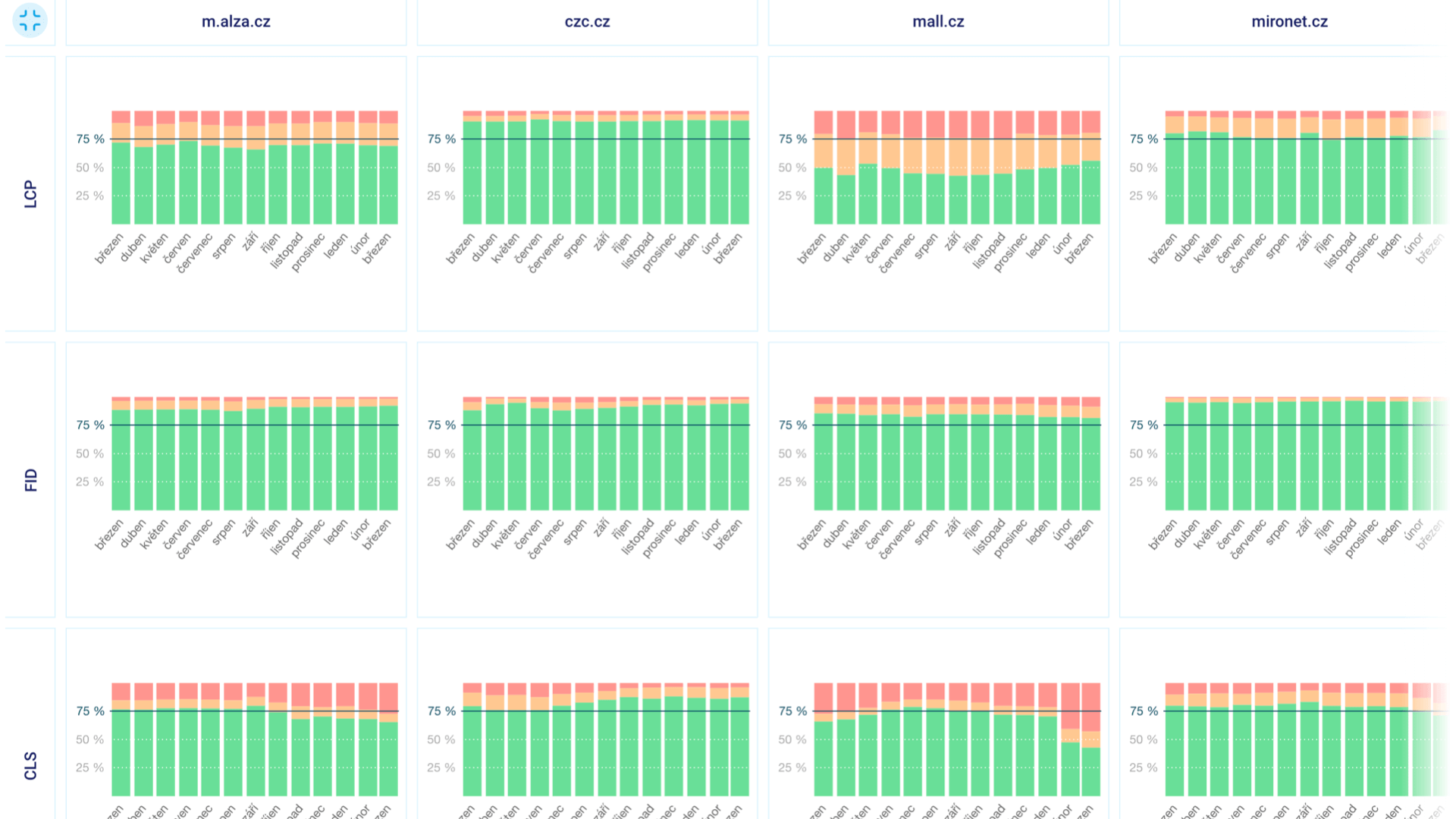
In the “Domains” report, you'll see the monthly data evolution for all domains entered in the test and the Web Vitals metrics (LCP, INP, CLS).
You can toggle data by device type (Mobile, Tablet, Desktop) or display type – you can view either the distribution or the 75th percentile:
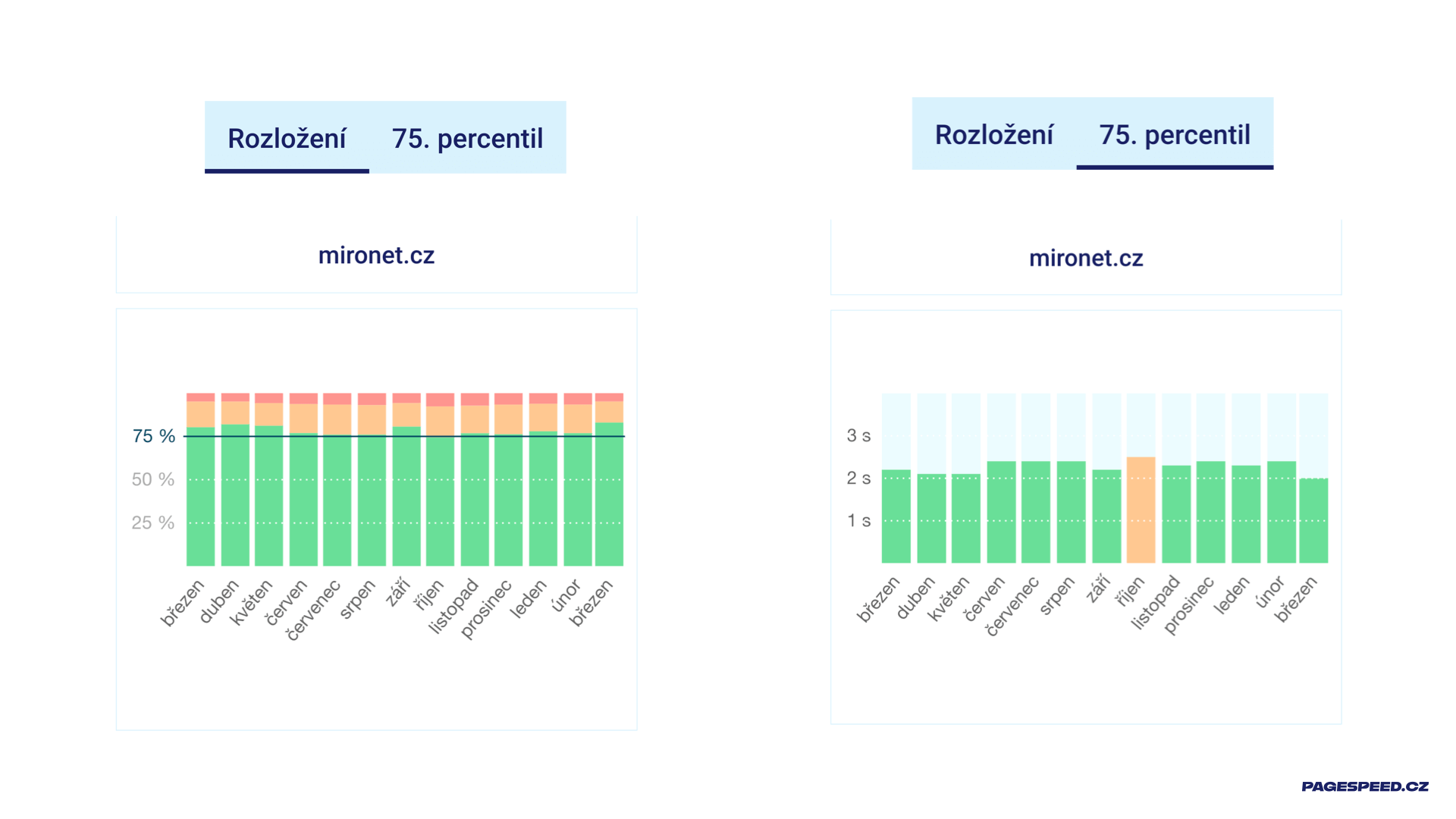
Let's explore the differences between these display types:
- The “Distribution” graph shows what portion of your users meet a given metric (green), which needs improvement (orange), and for which portion Google considers the user experience slow.
- The “75th percentile” graph is even more intriguing – it shows you the value at the 75th percentile, which is the value on the dark-marked line in the “Distribution” graph. It's also the number that interests Google. For instance, the image shows the LCP value for the domain mironet.cz in March 2021 (right) is 2.0 seconds. The maximum for meeting the metric according to Google is 2.5 seconds, so everything is fine, as indicated by the green color.
Note: In the "Domains" report, we download data from the Chrome UX Report for Czech and Slovak web users, so if you operate a service for foreign visitors, data may not be visible.
Why is Domain Comparison Useful?
If you're addressing speed, it's crucial to focus on it long-term and understand how you stand with real users, how your competition is doing, and how Google evaluates the web. You'll find all this in our "Domains" overview.
We show these graphs to our clients during long-term work on speed optimization, and they are essential for evaluating whether the efforts are successful.
Let's see what can be gleaned from this graph for one of our client websites:
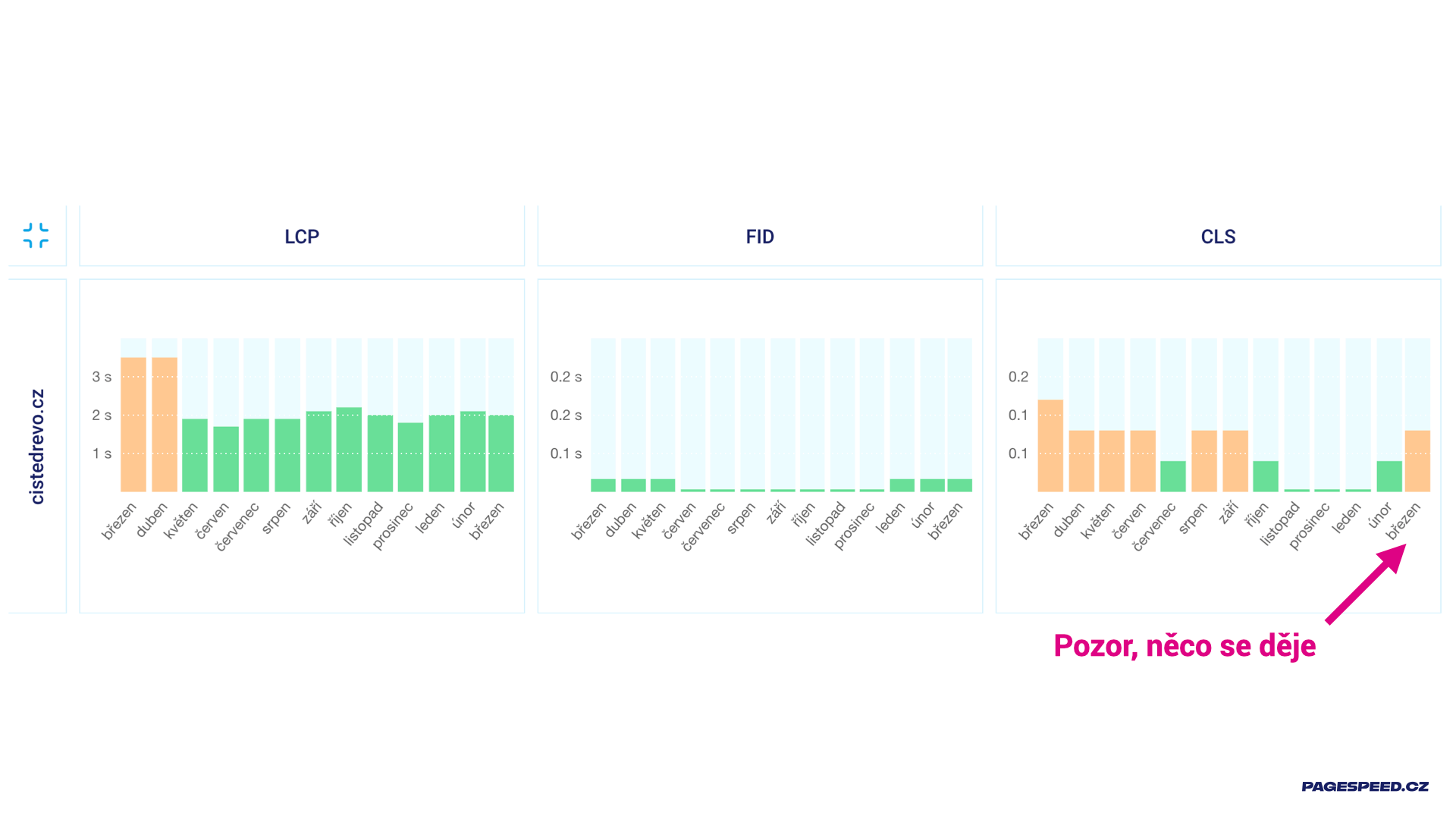
The green bars in the March 2021 numbers (right) for the LCP and FID metrics tell us that for the entire domain, we meet two out of the three Web Vitals metrics. Additionally, the graph shows that the metric status is relatively stable. That's the good part of the report.
The bad part is the "erratic" CLS metric, which in March 2021 jumped from the recommended maximum of 0.1 for the entire domain. So something is happening, and we should act. Just be aware, these are user data. It doesn't necessarily mean that something on the website changed for the worse, but it could be that something changed for the users, or even that the metric calculation itself changed.
In this case, we are lucky, though I’m not sure if that’s the right word – all three factors play a role here. Besides site adjustments, users also updated to a new version of Chrome, which calculates Cumulative Layout Shift slightly differently.
So I see the status and I see the development. That's exactly what I need for long-term project work.
You might have noticed that we also download data for backend speed (TTFB), a metric not included in Core Web Vitals. This is so you can easily evaluate whether slow LCP is due to frontend or backend issues.
We believe the new data in the reports will help you too.
"Summary" Tab and Metric Changes
In the new "Summary" tab, we display the speed status of the main measured page on a given day. We've also added information about metric changes in the short and long term.
Previously, you could already see the speed status of the measured page here. If we have user data from the Chrome UX Report, we display four "gauges," otherwise just one from the Lighthouse tool:
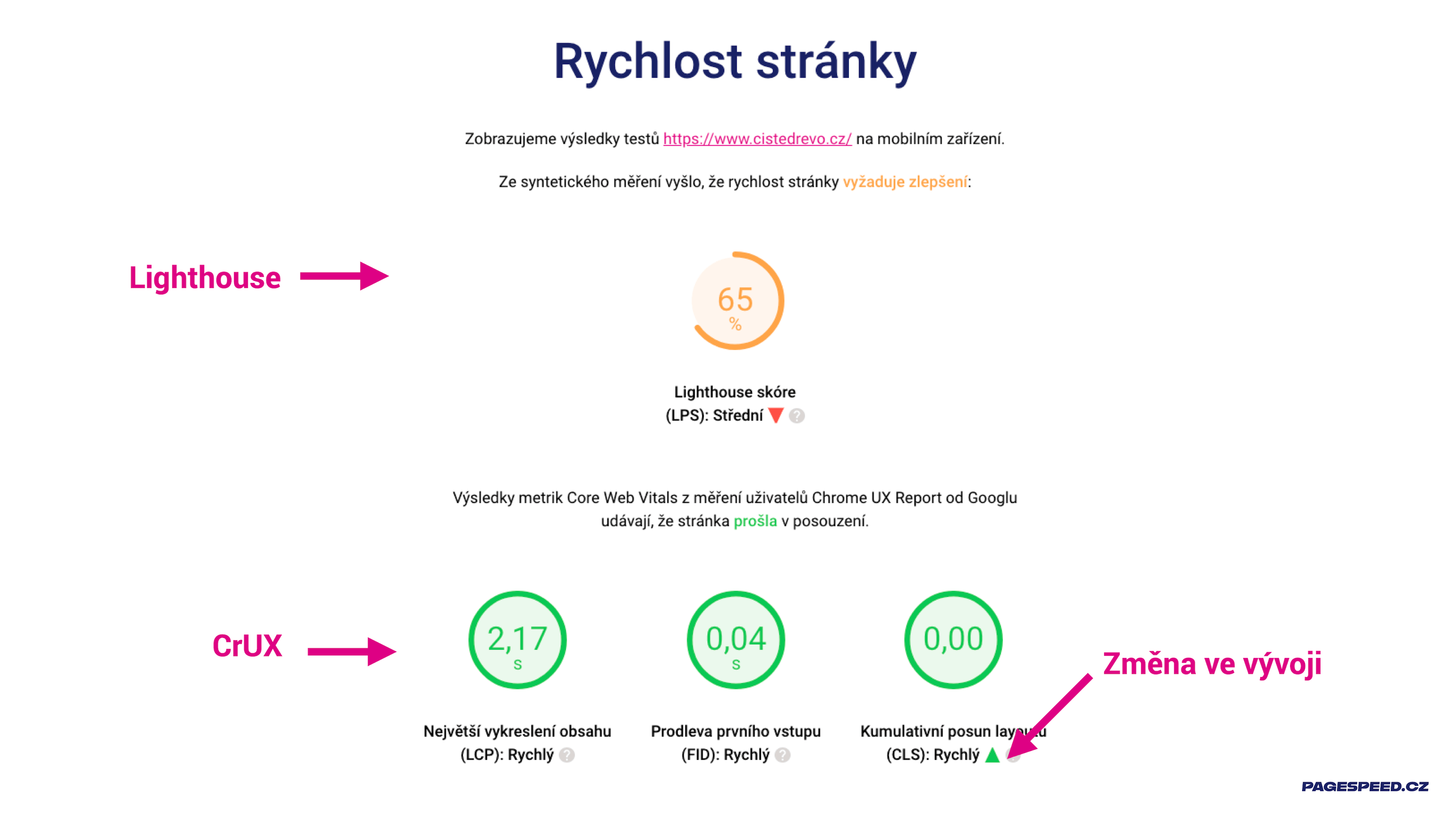
Notice that we now highlight metric development over time. Changes in metric values greater than 15% compared to the state a week ago are reported here.
Domain speed is new in this section. If there is enough user data in the Chrome UX Report, you'll see three "gauges" for Core Web Vitals and again development over time. This time we compare the current state to today with the state a month ago, as we consider it more appropriate to monitor long-term development here:
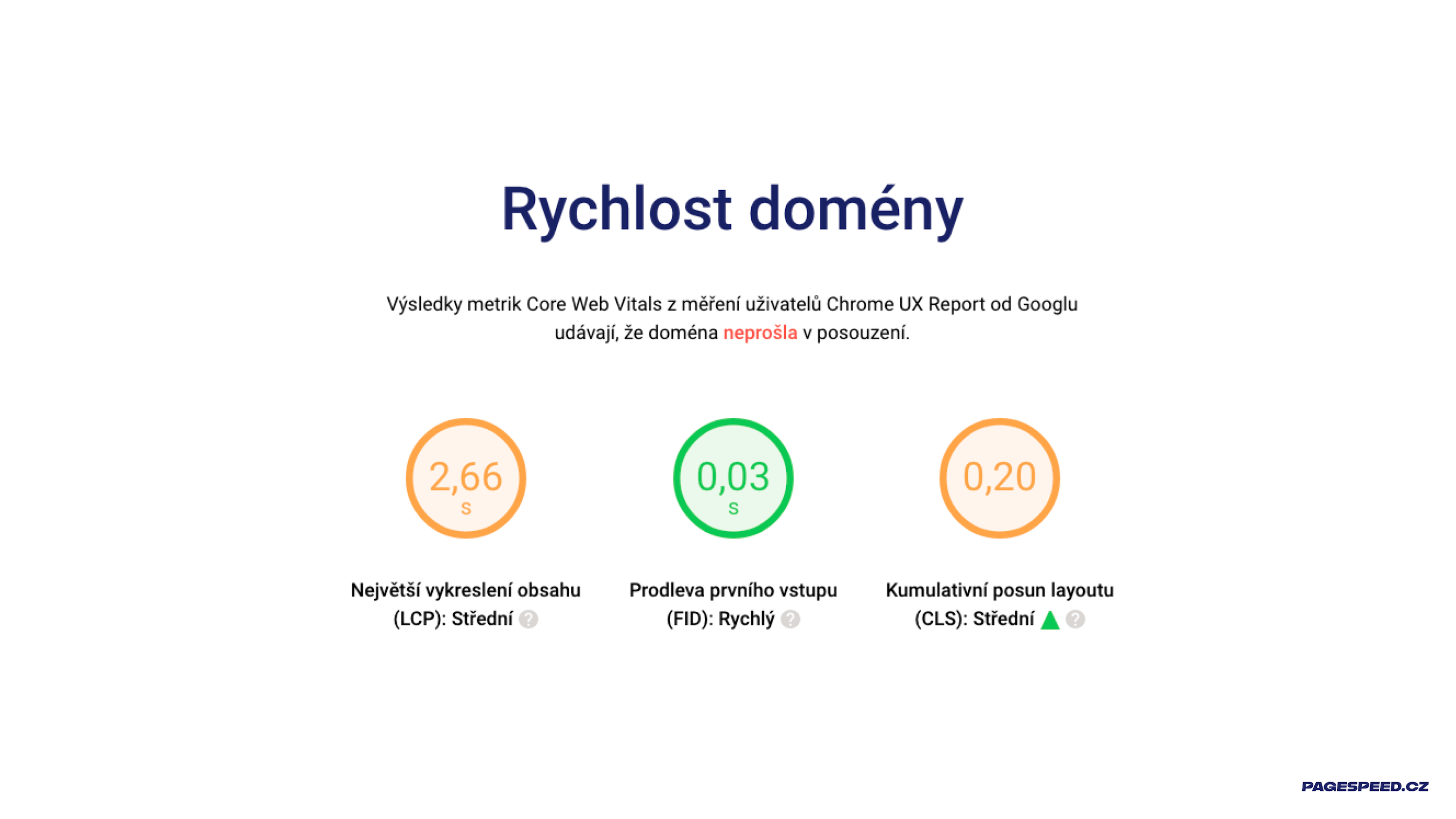
Data in the "Summary" tab comes from the PageSpeed Insights API, and user numbers from CrUX represent a cumulative average over the last 28 days. Therefore, data in the "Summary," like "Measurements," may differ from data in the "Domains" tab, where they are monthly.
More about the “Summary” report can be found in the documentation.
Periods in Graphs and Metric-Based Switching
This change is one you've often requested. Historically, we didn't use any filters in graphs; initially, they weren't necessary. But for some domains, we've been monitoring speed metrics daily for almost a year, and often we'd like to look at the development over the last month or three months:
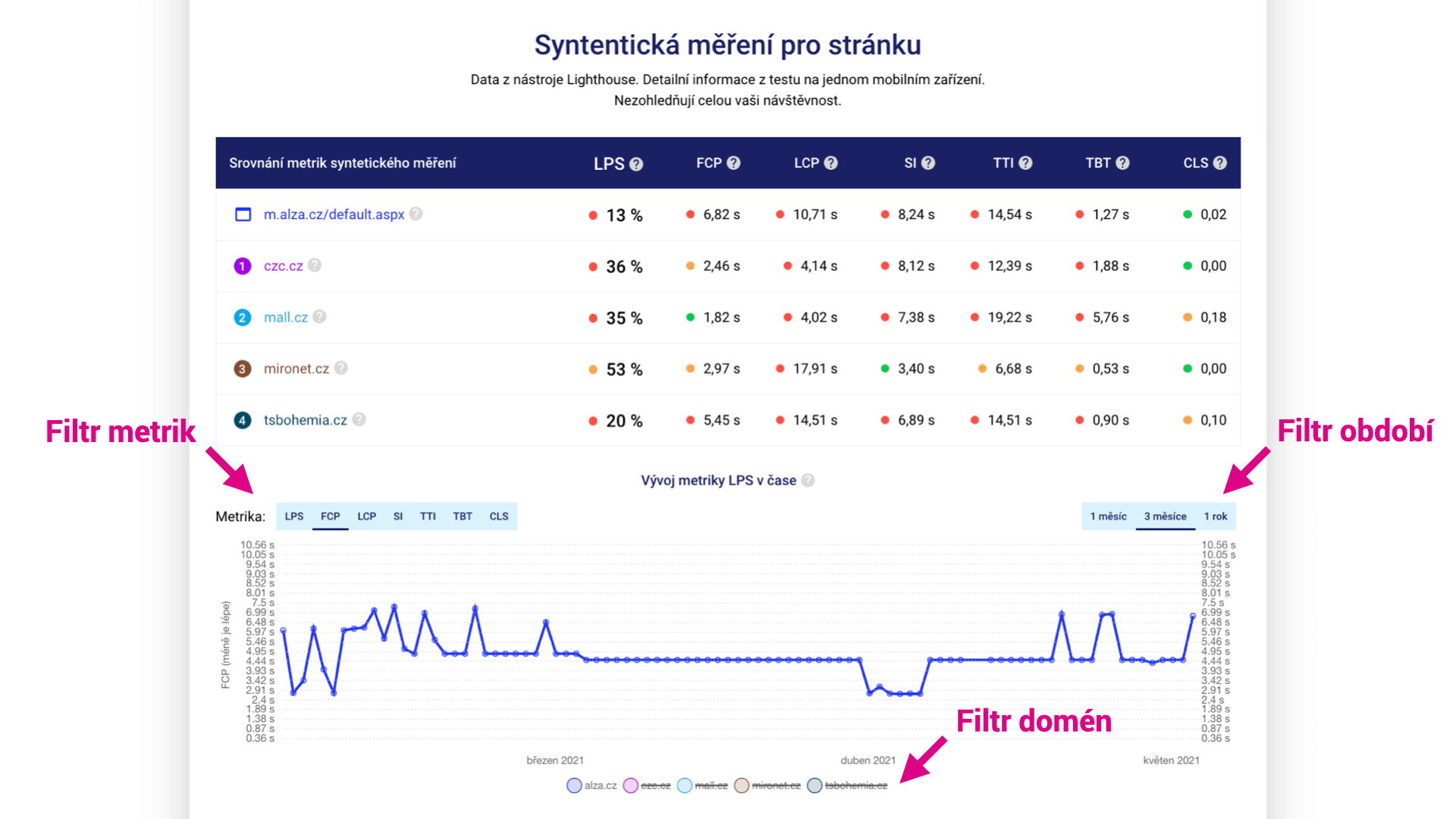
It is now also possible to switch Metrics in some graphs. Who wouldn't be interested in the development of LCP measured by Lighthouse?
First tip: Did you notice that it's possible to turn off the display of measured URLs in the graphs to get a beautiful clean graph for just one of them?
Second tip: Click on a dot in the graph and get the complete Lighthouse report for the given URL and test.
Minor Adjustments
In version 2, we've also made a number of other changes; here's a list of the most important ones:
- We've adjusted the appearance of "gauges" in the test summary to better reflect the metric status.
- We've divided the test content into tabs, added explanations of what you'll find in them, and made several other adjustments for a clearer interface.
- We've fixed functionality when using the Back button in the browser.
- We now provide more explanations for possible errors returned by PageSpeed Insights.
How to Use the New Features in PageSpeed.ONE Tester?
For our clients, we always create two tests:
- A test for the client's domain and their competitors. Here, in the "Domains" tab, you will see how the client's domain performs in terms of speed and how the market they are trying to succeed in is doing.
- A test for the landing pages of the website. In addition to the homepage, we include, for example, a content page or article category for content websites. The Web Vitals report from Google Search Console helps in selecting suitable URLs.
If a client uses multiple domains or subdomains, we create another test just for these domains. CrUX data can differ for domains example.cz and subdomain.example.cz.
Do you like the new features in the tester? Or is there something you think is missing? Write to us at info@pagespeed.cz. We welcome any feedback or ideas.